01 / BEFORE YOU FLY
Get online before landing.
A China travel eSIM is a straightforward starting point if your phone is unlocked and supports eSIM.
- Check your phone and choose a plan. Confirm unlock status, eSIM support, mainland coverage, activation rules and validity. For roughly two weeks, 10–20 GB is a reasonable planning estimate for maps, messages and translation; video and hotspot use need more.
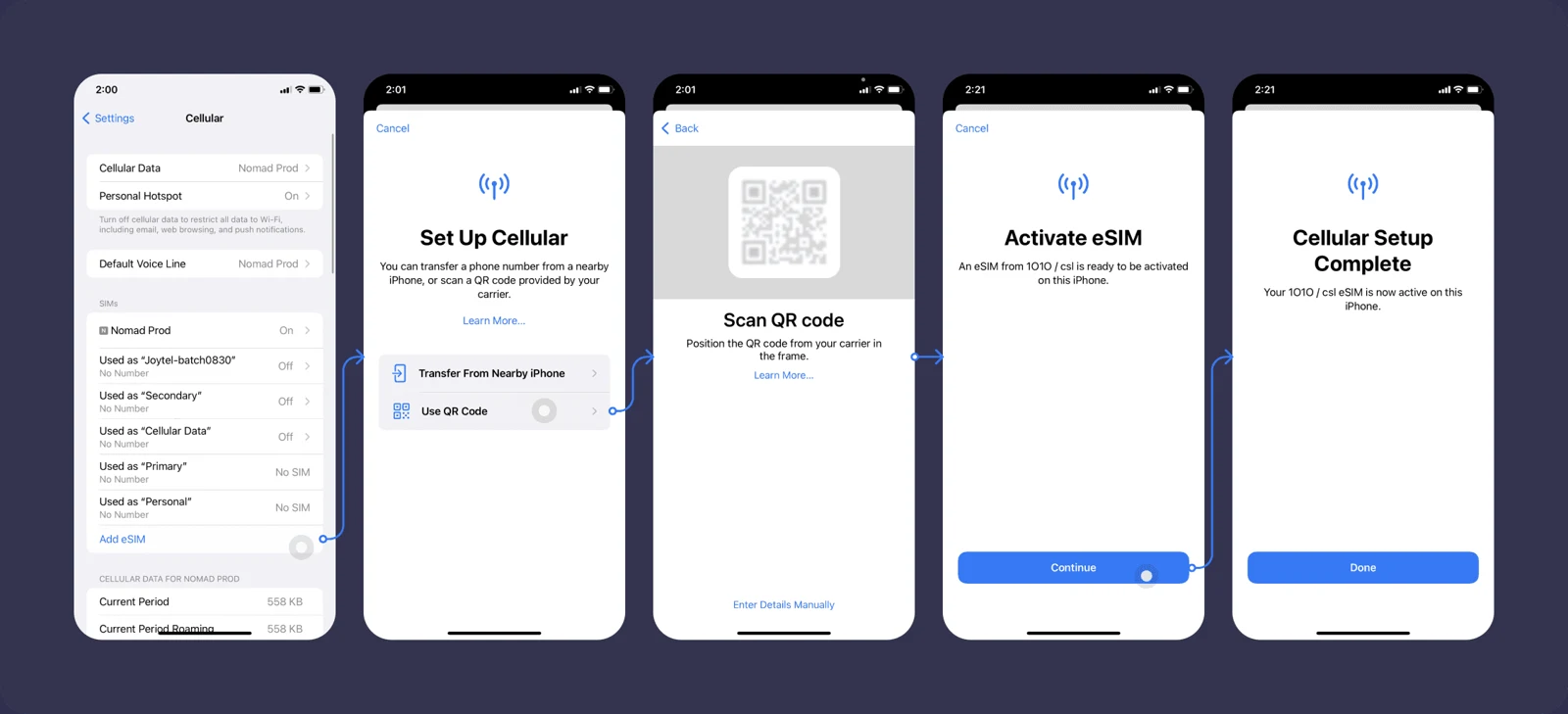
- Buy and install before departure. Nomad is one option. It says new China plans cannot be purchased inside mainland China. Follow the provider’s instructions on when validity begins. Use the QR code issued for your own plan.
- Select the travel line for mobile data. On arrival, enable it and turn on its data roaming if the provider requires it. Disable home-line data roaming and automatic data switching.
- Keep your usual number available for verification texts. Travel eSIMs are usually data-only. Check home-carrier charges and how to receive bank and app SMS abroad. [9]
Need a Chinese phone number?
A local +86 SIM helps with calls and some delivery or booking services. Take your passport to an official China Mobile, China Unicom or China Telecom outlet. Ask staff to activate and test it. Before leaving the airport, turn Wi-Fi off and test mobile data. [10]
02 / INTERNET ACCESS
Know which connection you’re using.
A travel eSIM and a VPN do different jobs. Switching to hotel Wi-Fi can change which overseas apps work.
| Connection | What to check |
|---|---|
| Travel eSIM with international routing | Nomad says its China plans support Google, Gmail, WhatsApp, YouTube and Instagram without a separate VPN. Do not assume every eSIM works the same way. [9] |
| Hotel Wi-Fi or mainland local SIM | Local internet restrictions apply. Overseas apps may stop loading when you join Wi-Fi. |
| Home-carrier roaming | Access and cost depend on the carrier. Confirm both before departure. |
If you plan to use a VPN
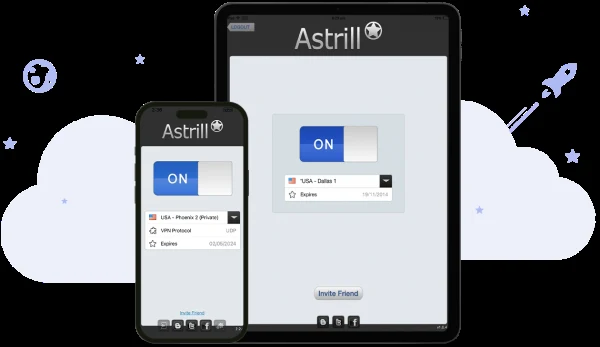
Install it on every device before traveling, sign in, and save setup and support instructions offline. Astrill is an option to research, but reliability changes. Its StealthVPN protocol supports Mac, Windows and Android, not iPhone; check device compatibility. [11–12]
China restricts unauthorized VPN use. Check current travel advice and local rules. No provider is guaranteed to work everywhere.
03 / YOUR EVERYDAY WALLET
Set up Alipay at home.
Have your passport, an eligible bank card and an SMS-capable phone number ready.
- Install Alipay and choose English. Register with your country code and phone number.
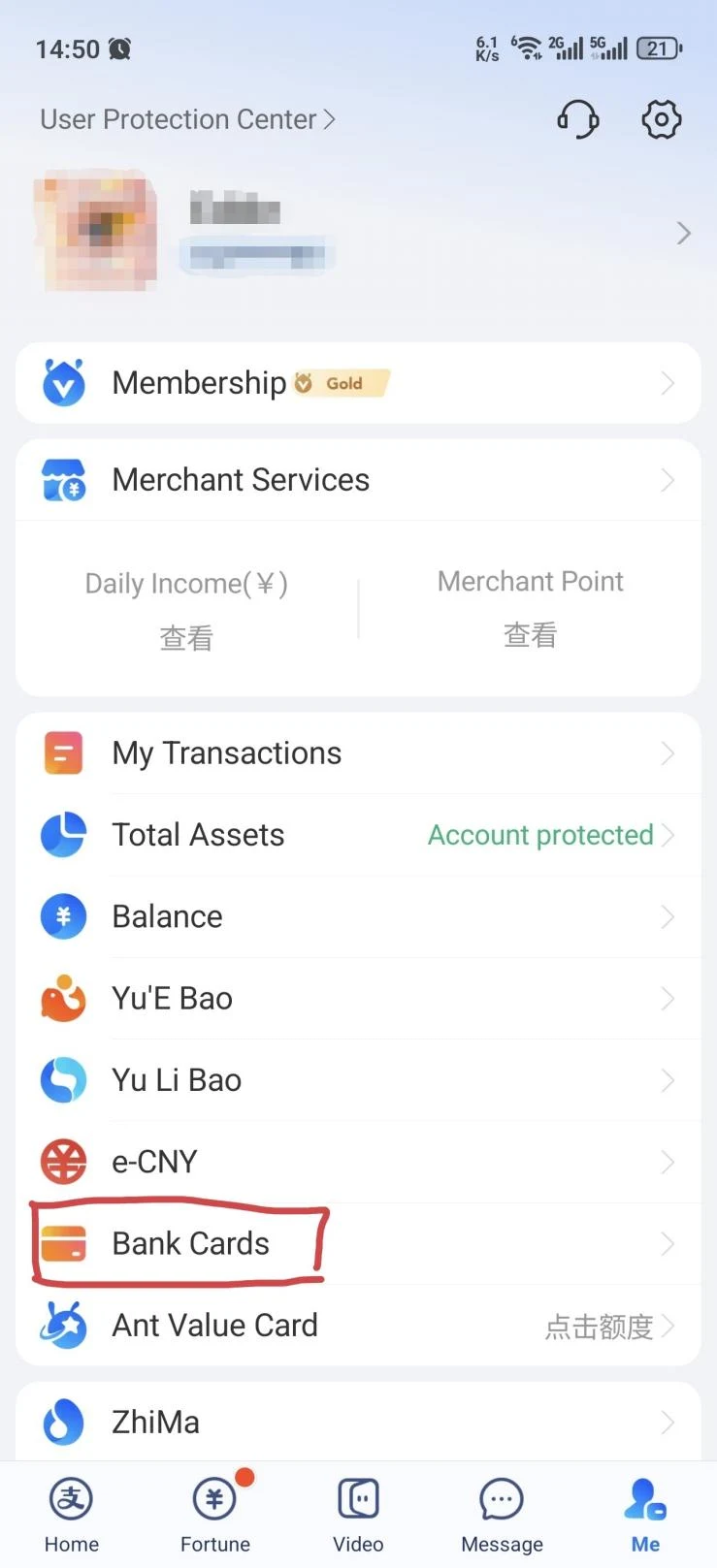
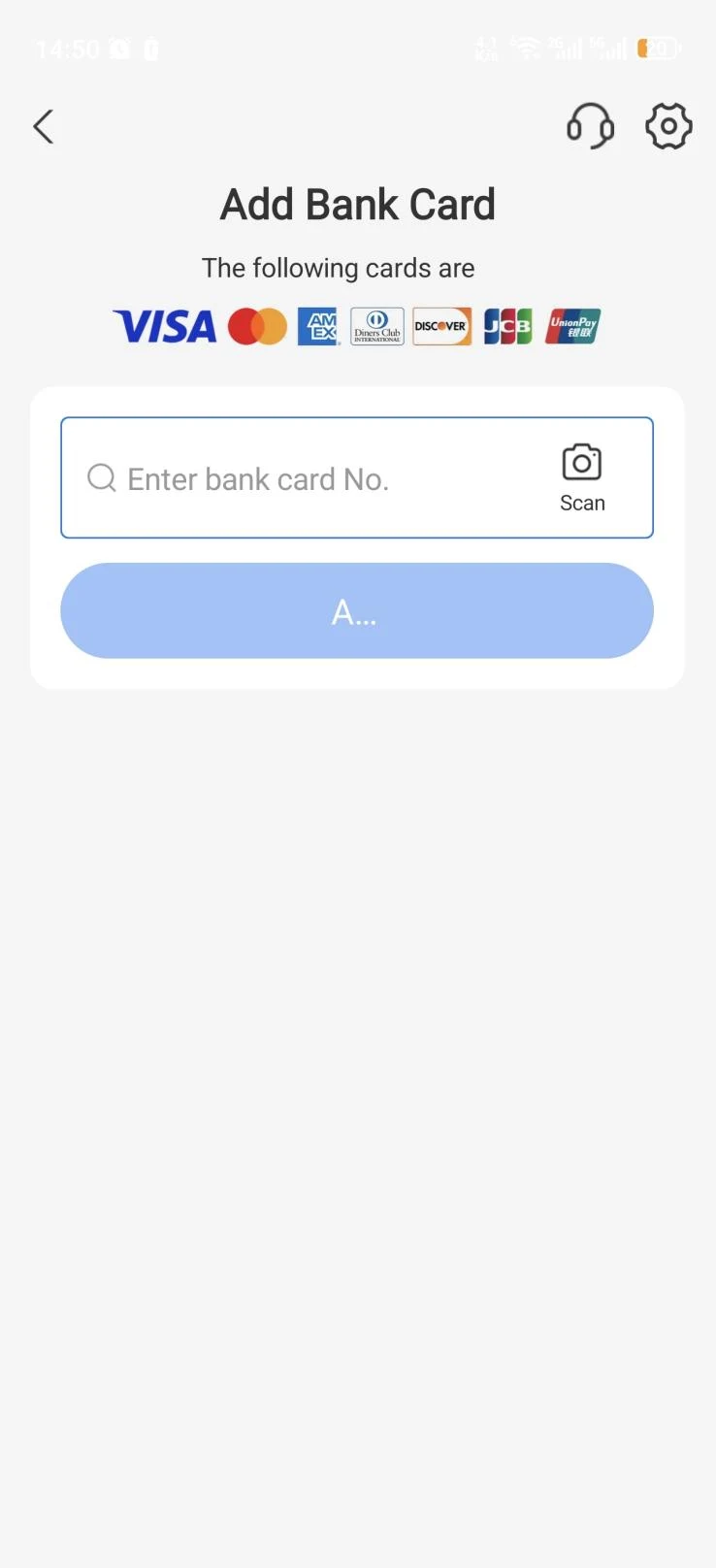
- Open Me → Bank Cards → Add. Enter an eligible foreign card. A Chinese bank account is not required. Eligible debit cards may work too; acceptance depends on the card and issuing bank.
- Complete the prompts. Follow bank verification and identity checks, using accurate passport details.
- Set your payment password. After arrival, make a small merchant purchase to confirm that everything works. [1–2]
04 / AT THE COUNTER
Two ways to pay.
You scan the shop’s code.
Tap Scan. Check the merchant, enter the amount if asked, and confirm. Show the successful payment screen.
The cashier scans your code.
Open Pay/Collect or your payment code. Let the cashier scan the live code in your own app.
If the result is unclear, check transaction history and ask the cashier before paying again. Overseas cards support merchant purchases, not person-to-person transfers. If a personal transfer fails, ask for the merchant payment option or use a backup. [3]
Phone first. Keep a backup wallet.
Direct foreign-card acceptance varies. Keep your physical card and a modest RMB cash reserve—for example, ¥300–500 for ordinary city travel.
Payments up to ¥200 generally have no platform service fee. Above ¥200, a 3% fee on the full amount may apply. Check the screen; your bank may charge separately. [2]
No routine tipping.
Tips are generally not expected at ordinary restaurants. Some venues add a service charge. Private guides and tours may have their own arrangements. [22]
05 / YOUR SECOND ESSENTIAL APP
WeChat: messages, menus and backup pay.
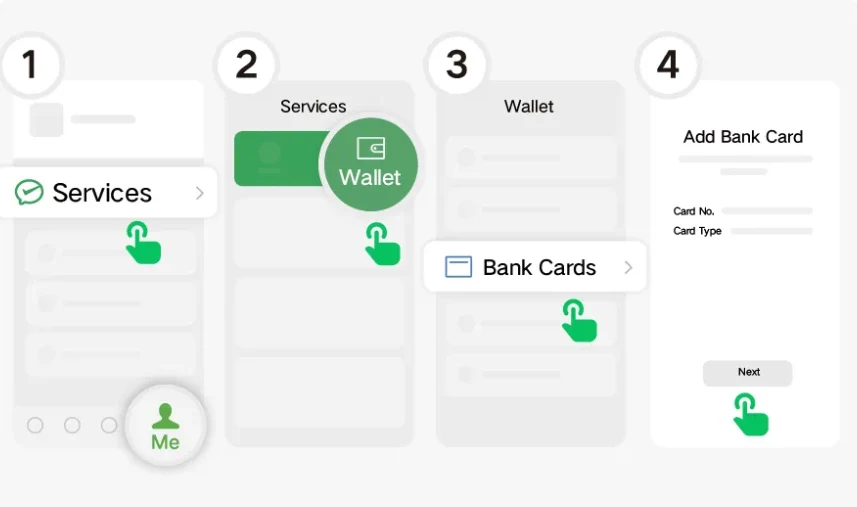
Register before departure so you have time to complete account checks. To add a card, open Me → Services → Wallet → Bank Cards and follow the identity and card prompts. A new account may need additional activation before these options appear. [1]
- Add your hotel, guide or local host when useful.
- Use WeChat’s built-in scanner when a restaurant’s code asks for WeChat.
- Open Me → Services → Ride Hailing to book DiDi directly.
06 / GET A CAR
Book DiDi inside Alipay or WeChat.
No separate DiDi app is required.
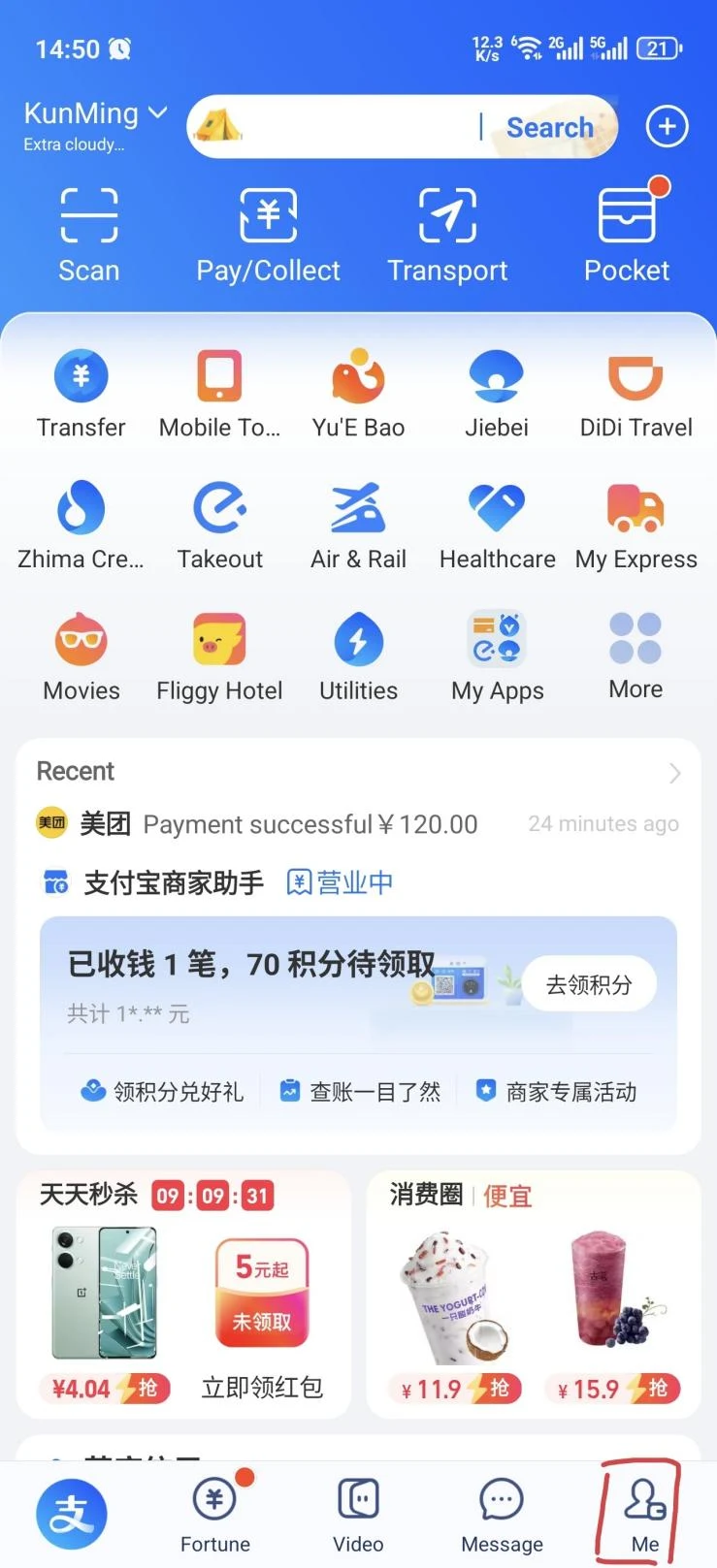
From Alipay
Tap DiDi Travel, or search for DiDi. Transport → Taxi is another entry in supported layouts.
From WeChat
Open Me → Services → Ride Hailing. Look under Travel & Transportation. [5]
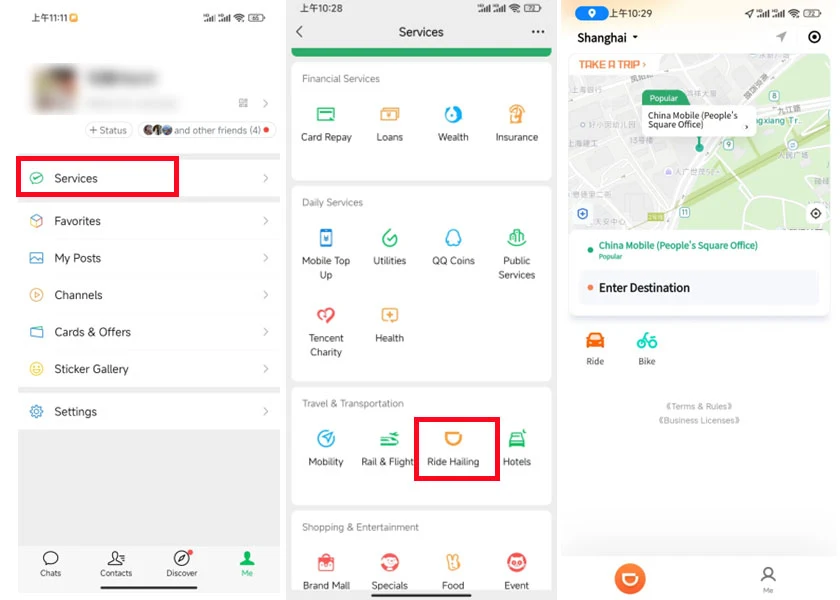
- Enter the destination. Paste the Chinese hotel or attraction address when the name is ambiguous.
- Confirm the exact pickup point. Check the entrance, terminal, parking level or zone number. Walk there before requesting. Airports use designated pickup zones.
- Select a car and review the estimate. Confirm the request. Use in-app messages to contact the driver.
- Match the plate and verify your trip. Show the requested trip code, often the last four digits of your registered number. Check payment status after the ride. [5]
07 / FIND YOUR WAY
Use Amap and check the metro exit.
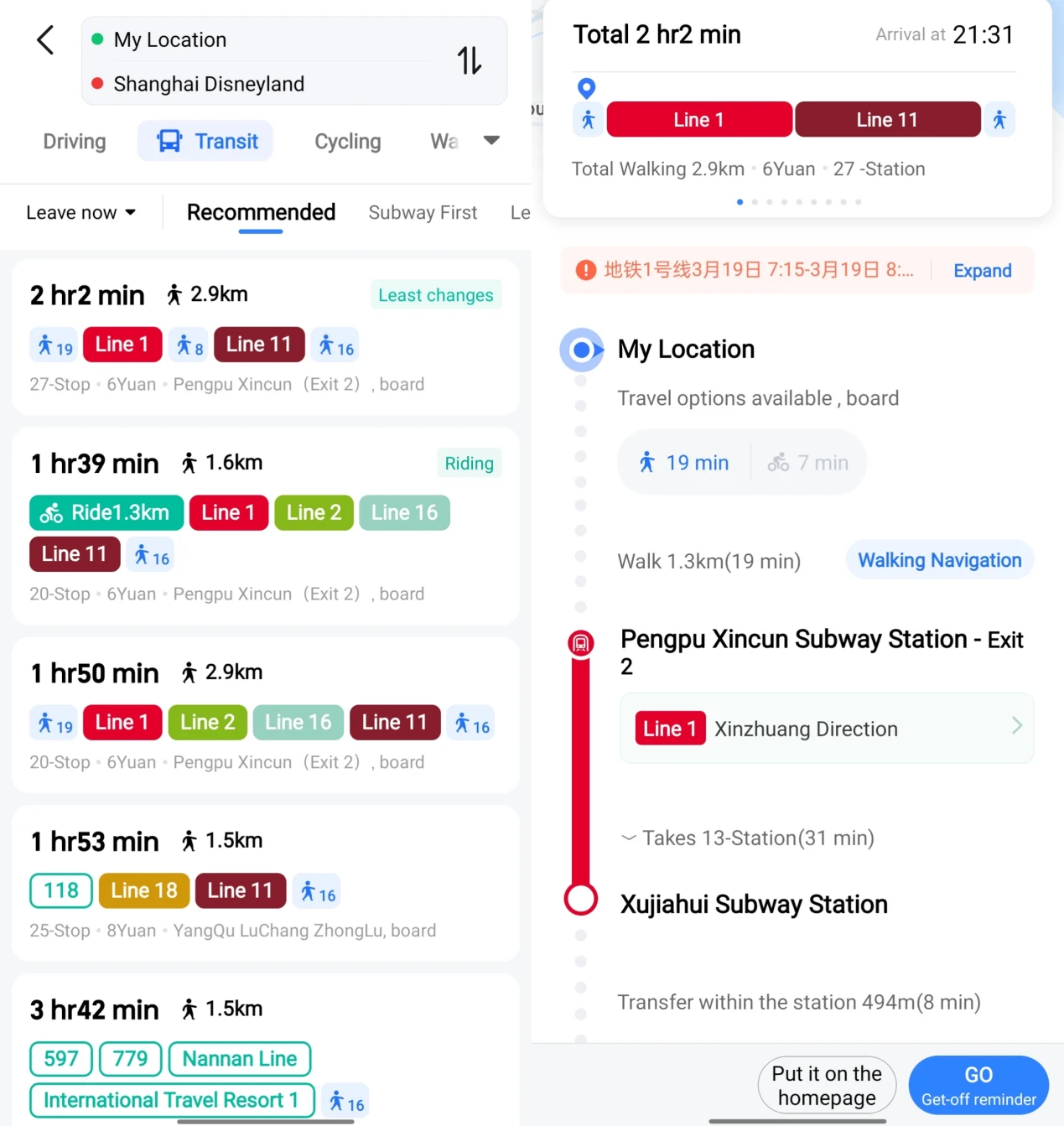
Install Amap / AMap Global and choose English where available. Save your hotel’s Chinese name, address and phone number offline. Search the exact destination, compare walking and transit routes, and check the entrance or station exit. [7]
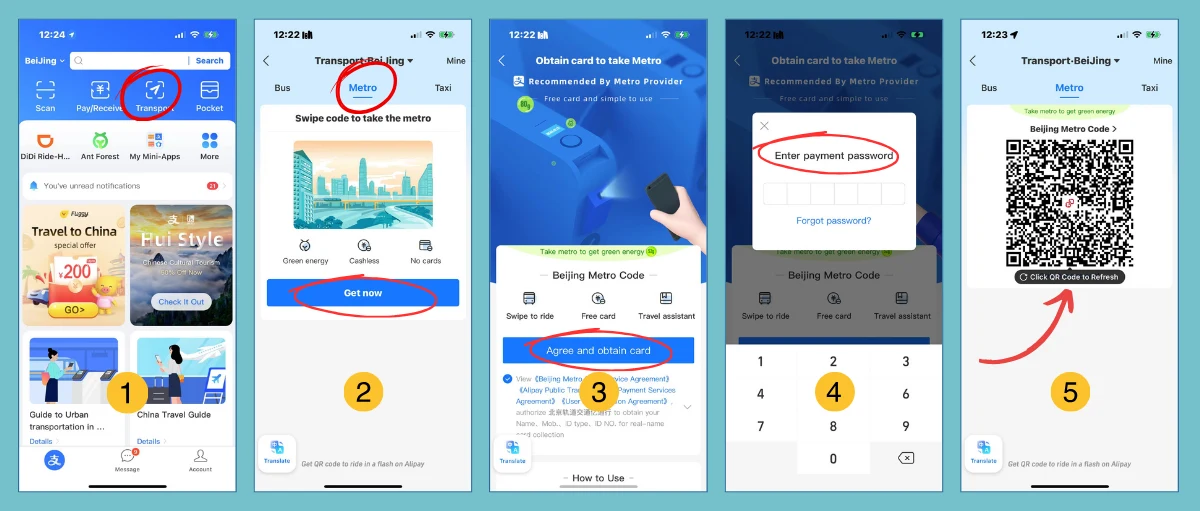
Your metro code is different from your payment code.
In Alipay, open Transport, choose your city and activate its metro service if your account is supported. Use the same activated transit code to enter and exit. If activation fails, buy a ticket or ask the staffed counter. Available payment methods vary by city. [6]
08 / UNDERSTAND AND BE UNDERSTOOD
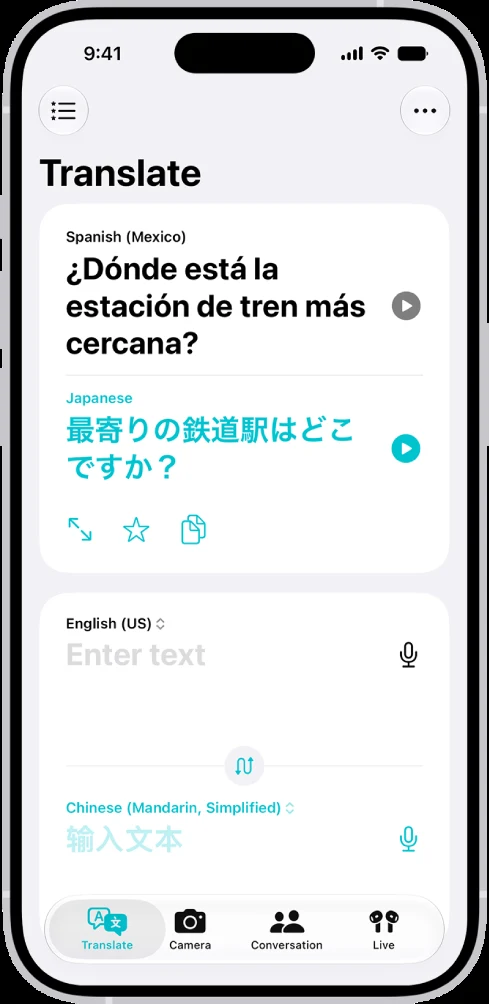
Keep a translator one tap away.
- Choose English and Chinese. Select Mandarin / Simplified Chinese where the app distinguishes them.
- Download languages before departure. Apple Translate and Google Translate offer offline packs. Test the functions you need in airplane mode; not every feature works offline. [13–14]
- Type or speak a short sentence. Use direct wording such as “Please take me to this address.” Show the translated text.
- Use Camera for menus and signs. For text already on your phone, take a screenshot and use a supported image-translation tool.
09 / EAT WELL
Order dinner with a QR code.
The code on your table usually opens the menu inside Alipay or WeChat.
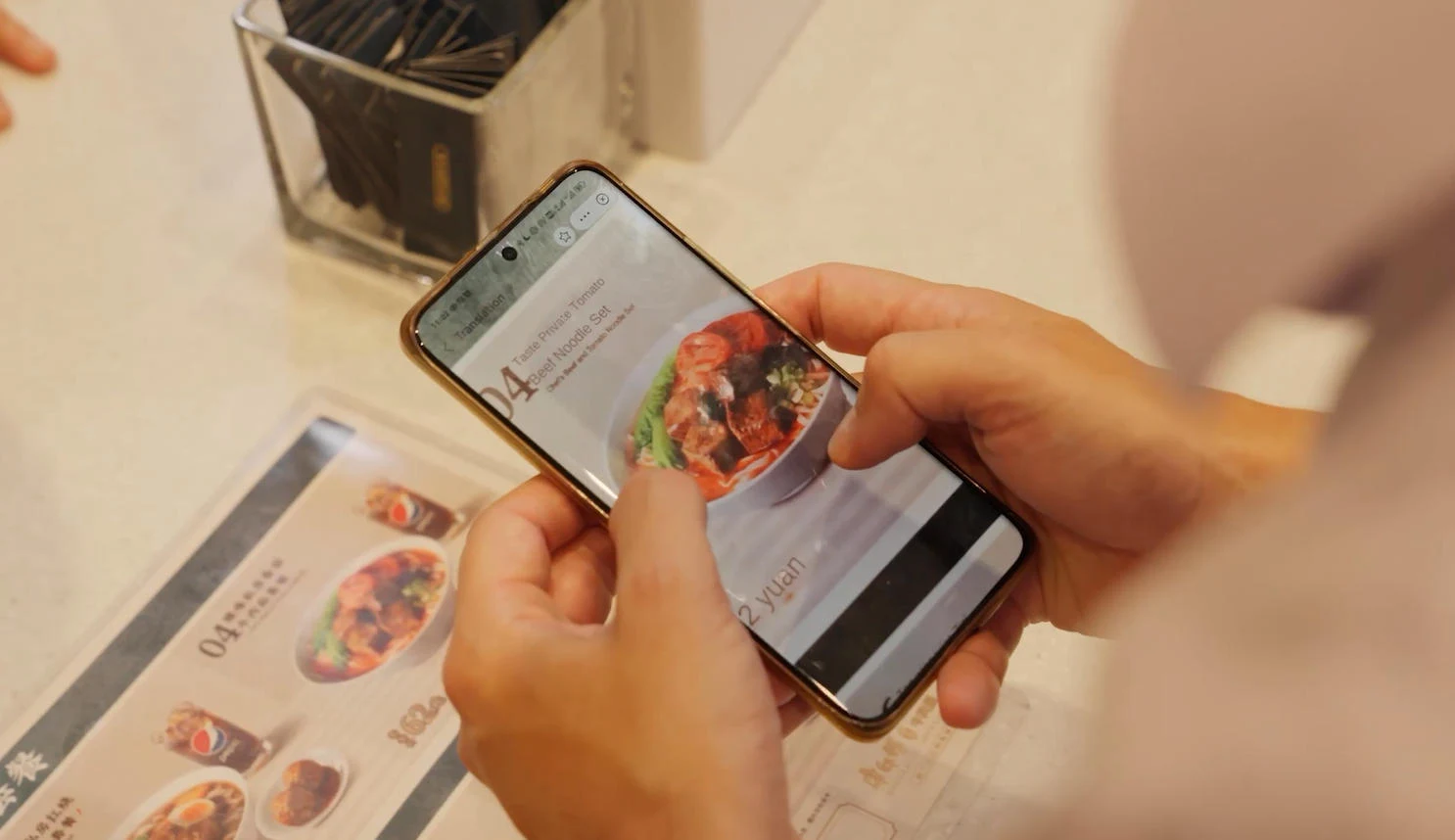
- Scan with the indicated app. Use its built-in scanner. Confirm the table number and choose dine-in or takeaway.
- Choose dishes and options. Use pictures and translation. Check quantity, spice level and add-ons before submitting.
- Check when to pay. Some restaurants ask for payment before cooking; others charge after the meal. Confirm the order went through. [16]
If the menu won’t work
Ask staff to take your order or point to a dish photo.
请帮我点餐。
Please help me order.
For hotel delivery
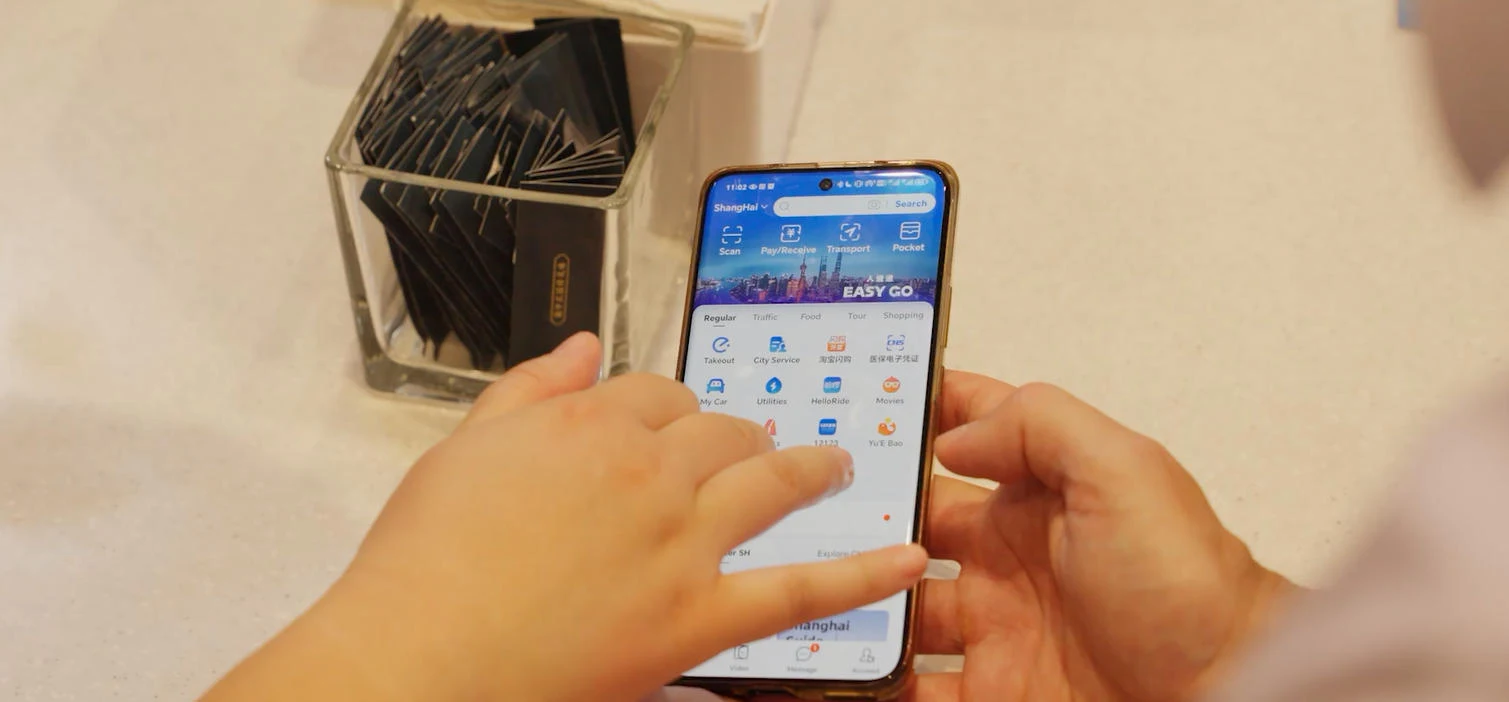
Ask reception about access and driver contact. Some services need a local number. In Shanghai, try Easy Go inside Alipay. [15]
请不要放辣椒。
No chili, please.
In Shanghai, Easy Go inside Alipay can translate a paper menu using the camera. Elsewhere, use your translator or ask staff.
10 / BETWEEN CITIES
Train tickets and hotel check-in.
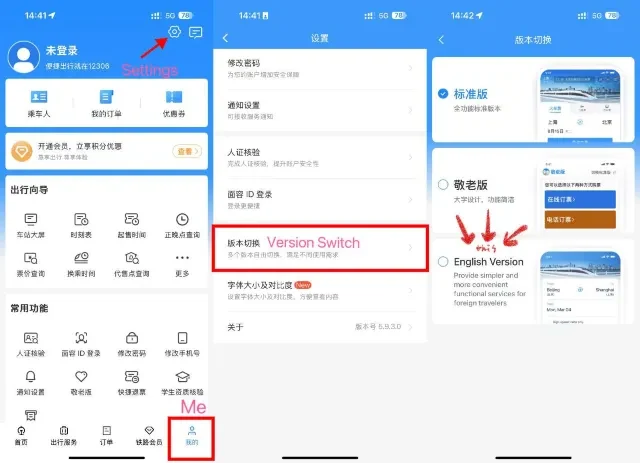
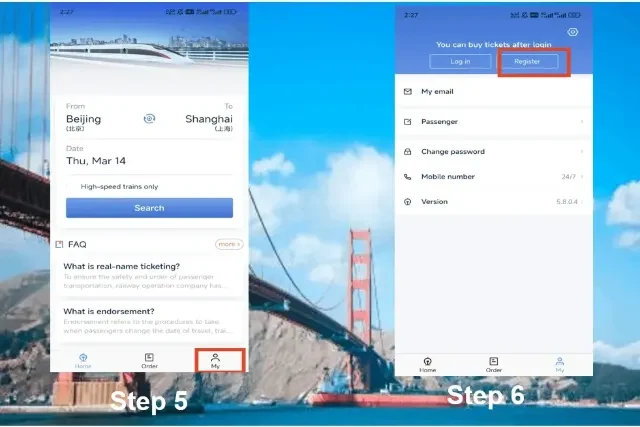
- Register and verify. Use the official Railway 12306 app or its English website. Enter passenger details as instructed and complete passport verification.
- Confirm the exact train and stations. Check date, departure station, arrival station and seat class. Pay and confirm the ticket was issued; a pending request is not a ticket.
- Bring the original passport used for booking. Allow extra time at an unfamiliar station. One hour is a useful planning buffer. [17]
Checking in or staying with family
Bring your original passport and booking confirmation to the hotel. Hotels handle accommodation registration. For a private home or other non-hotel stay, you or your host must arrange registration within 24 hours. [19]
11 / SAVE THIS FOR ARRIVAL
Your first-day cheat sheet.
- Before flying: check entry permission for your passport and itinerary. Install apps and finish account checks.
- At arrivals: test mobile data with Wi-Fi off, make a small payment and find your official taxi queue or pickup point.
- In your day bag: phone, cable, power bank, tissues, hand sanitizer, water and payment backup. Keep your hotel address in Chinese.
- Drinking water: choose sealed bottled water or properly boiled drinking water. [23]
- Electricity: mainland supply is 220V. Check chargers for 100–240V. A plug adapter does not convert voltage. [24]
- Domestic flights: power banks need a clear CCC/3C mark and must not be recalled models. Check current airline battery rules. [20]
Show these phrases
| English | 简体中文 |
|---|---|
| Please help me order. | 请帮我点餐。 |
| Please take me to this address. | 请带我去这个地址。 |
| Can I pay cash? | 可以付现金吗? |
| Where is the restroom? | 洗手间在哪里? |
| I do not speak Chinese. | 我不会说中文。 |
| Please call an ambulance. | 请帮我叫救护车。 |
A data-only eSIM does not provide normal voice calls. Ask nearby staff to call if your phone cannot. [21]
12 / REFERENCES
Sources and screenshot credits.
This guide covers mainland China. App layouts, prices, coverage and rules can change; follow the current in-app instructions. Sources checked November 4, 2026.
Screenshots and illustrations belong to their publishers and app owners. These are published reference screens, not fresh captures from a traveler’s account. No app screen was AI-generated. Images are reproduced for explanation with source credit; tap any image to enlarge.
- Mobile payments: current Alipay and WeChat stepsShanghai government, September 2026
- Overseas cards, payment fees and ATM cashShanghai government, September 2026
- Merchant payments and personal-transfer limitsBaiyun government payment handbook, 2024
- Alipay and WeChat screen examplesKeats School practical manual, 2026, pp. 22-24
- DiDi in WeChat and Alipay; driver verificationShanghai government, updated July 2026
- Transport and metro screen examplesBeijing government visitor guide, 2024
- Amap route and navigation screenshotsShanghai government / Amap, published guide
- Nomad iPhone installation screenshotsNomad official installation instructions
- Nomad China connectivity and purchase restrictionsNomad official help center, accessed November 2026
- Local SIM cards and passport registrationShanghai government telecom guide
- Astrill interface example and supported protocolsAstrill official documentation; vendor claims
- Astrill protocol compatibility by deviceAstrill official protocol documentation
- Apple Translate screen and instructionsApple iPhone User Guide, accessed November 2026
- Download languages for offline translationGoogle Translate official help
- Food ordering and menu translation examplesShanghai government CIIE dining guide, October 2025
- Restaurant QR ordering and staff fallbackRX Global visitor guide, 2024
- Train booking and foreign-passport requirementsChina Railway 12306 official FAQ
- 12306 English settings and search screenshotsTrip.com tutorial, accessed November 2026
- Hotel and private-home accommodation registrationNational Immigration Administration, 2026
- Power banks on domestic flightsCivil Aviation Administration of China, 2025
- Emergency numbersBeijing government visitor services
- Tipping and restaurant service chargesShanghai Municipal Administration of Culture and Tourism
- Drinking waterTravelChinaGuide practical visitor advice
- Voltage and plug adaptersTravelChinaGuide practical visitor advice
- Current travel advice and VPN restrictionsU.S. Department of State